Thank You for Choosing Gold Manager Pro!
Your Windows installation package should begin downloading automatically. You're just moments away from precision jewellery management.
Step-by-Step Installation Guide
Follow these simple steps with screenshots to install and run Gold Manager Pro on Windows.
Click "More info"
When Windows Defender SmartScreen shows "Windows protected your PC", click the "More info" link as highlighted.

Click "Run anyway"
The screen will display the application details. Click the "Run anyway" button to launch the setup installer.

Select Destination & Click "Next"
The Setup wizard will open. Keep the default installation directory path and click the "Next" button to proceed.

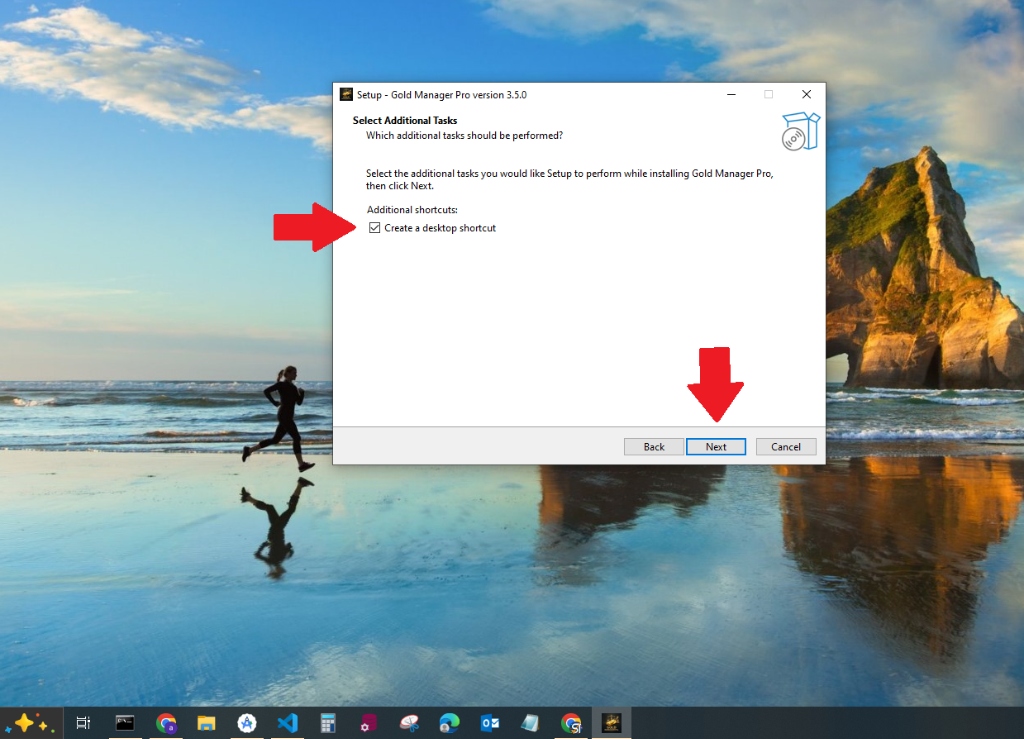
Check Desktop Shortcut & Click "Next"
Check the "Create a desktop shortcut" box so you can easily launch the app from your desktop, then click "Next" to finish!